
Yes, you can migrate a website without permanent SEO damage, but only if you treat it as an engineering project with search visibility as a hard requirement, not an afterthought. The pillars that make it work are a complete URL inventory, one-to-one 301 redirects, staged testing before launch, a rigorous launch-day verification pass, and daily monitoring for the first two weeks. Expect a temporary dip even when you do everything right. What separates a full recovery from a permanent loss is how fast you catch problems.
TL;DR:
- Thorough URL inventory and staged testing are crucial; missing URLs or wildcard redirects to the homepage are common causes of long-term traffic loss.
- Isolating change types, especially avoiding bundling domain changes with redesigns, helps diagnose and fix issues faster during launch.
- Daily monitoring of search and traffic data in the first two weeks is the most effective way to catch problems early and prevent prolonged recovery.
- Updating hreflang tags, canonical tags, and sitemaps simultaneously with redirects is essential for international SEO and avoiding indexing issues.
- Having a senior lead manage the entire migration process, including inventory, redirects, and post-launch checks, significantly reduces the risk of catastrophic failures.
Table of Contents
- What Counts as a Site Migration, and What Makes Each Type Risky
- Should You Isolate Changes or Bundle Them Into One Launch?
- Building the Pre-Migration Audit and URL Inventory
- Redirect Strategy: Mapping, Canonicals, and Hreflang
- Staging Environment Testing Before You Flip the Switch
- Launch Day: The First 48 Hours
- Post-Launch Monitoring: The First 14 Days and Beyond
- The Migration Mistakes That Cause the Biggest Losses
- Chrome Cactus Studio's Notes From Managed Migrations
- Handling International SEO During a Migration
- Telling Stakeholders and Users What's Changing
- Mobile and Core Web Vitals During the Move
- CMS and Platform-Specific Migration Pitfalls
- What the Checklist Gets Right, and Where It Falls Short
- When a Managed Migration Makes Sense
- Sources
What Counts as a Site Migration, and What Makes Each Type Risky
A site migration is any change that alters how search engines find, crawl, or evaluate your URLs. That is broader than most people assume. Moving from http:// to https:// is a migration. Swapping domains, restructuring your URL paths, switching content management systems, merging two sites, or redesigning the front end while keeping the same URLs can all qualify.
Each type carries a different risk profile. A protocol-only move (HTTP to HTTPS) is the lowest-risk category because your URL paths don't change, only the prefix does. A domain change is higher risk because you're asking Google to transfer trust and link equity from one host to another entirely. Restructuring URL slugs, folder hierarchies, or removing/adding subdomains is often the riskiest, because it touches every internal link, every external backlink target, and every indexed page simultaneously.
The reason URL changes matter so much comes down to indexing mechanics. Google doesn't instantly know that /old-page and /new-page are the same content. It has to recrawl, re-evaluate, and reassign ranking signals, and that process takes time even under ideal conditions. Google's own guidance on site moves describes this transfer of signals as gradual by design, not instant.
Some fluctuation during that transfer window is normal. Rankings often wobble for days or weeks even on a technically flawless migration, simply because Google needs to recrawl and reprocess the new URLs. What turns a normal wobble into a long-term loss is usually one of a small number of preventable failures: missing redirects, wildcard redirects that dump everything on the homepage, or an inventory that missed a chunk of the site entirely. Those failures, not the migration itself, are what cause the traffic charts you see in horror-story blog posts.
Should You Isolate Changes or Bundle Them Into One Launch?
Isolate them whenever you can. The single biggest operational decision in any migration is whether to change one thing at a time or roll multiple changes into a single cutover, and the SEO-safe answer leans hard toward separation.
Bundling a domain change with a full redesign, a CMS switch, and a URL restructure at the same time might feel efficient. It also makes every ranking drop impossible to diagnose. If organic traffic falls 20% two weeks after a combined domain-and-redesign launch, you have no clean way to tell whether the redirect map failed, the new templates hurt page experience, or the content itself changed enough to affect relevance. Google's own migration documentation effectively warns against this by recommending you move all URLs simultaneously within a single change type rather than compounding change types together.
Before you commit to a launch plan, run through a short risk assessment:
- How many URLs are in scope, and how many carry meaningful organic traffic or backlinks?
- Are you changing the domain, the protocol, the URL structure, or the content, and can any of these be sequenced separately?
- Which pages are revenue-critical (checkout flows, top landing pages, lead-gen forms) and need dedicated redirect testing before anything else?
- Do you have a rollback plan if the new environment fails a launch-day check?
- Who signs off on go/no-go, and what is the exact criteria?
A useful trigger for phasing rather than bundling: if your site exceeds a few thousand URLs, or if more than a handful of pages drive real revenue, don't combine a domain change with a structural overhaul in the same week. Smaller sites with a clean, well-documented URL set can sometimes handle a combined migration safely, but "sometimes" is not a plan. Lock your scope in writing before development starts, and treat any addition to that scope as a red flag worth a second conversation.
Building the Pre-Migration Audit and URL Inventory
This is the phase most teams underinvest in, and it's the single biggest predictor of whether your migration recovers in four weeks or four months. Everything downstream, your redirect map, your testing plan, your rollback criteria, depends on how thorough this audit is.
1. Capture your baseline before anything changes
You need a snapshot of exactly how the current site performs, so you have something to compare against after launch. Pull these exports and store them somewhere your whole team can access:
- Google Search Console: export your top 1,000 queries and pages by clicks and impressions, plus your current index coverage report.
- GA4: export your top landing pages by sessions and conversions for at least the trailing 12 months, to account for seasonality.
- A full site crawl using a tool like Screaming Frog, capturing every indexable URL, status code, canonical tag, and internal link structure.
- A backlink export (Ahrefs, Semrush, or similar) showing every referring domain and the exact URL each link points to.
- A list of any URLs currently ranking on page one for commercial or high-intent queries, since these need individual attention in your redirect map.
Search Engine Journal's migration framework treats this baseline capture as its own dedicated phase before any build or redirect work begins, and for good reason: without it, you can't prove what changed after launch, only guess.
2. Build the source-of-truth URL inventory
Your crawl gives you a list of URLs, but the inventory is more than that. It's a working spreadsheet where every single live URL gets a row, along with its current traffic, its backlink count, its target redirect destination, and a status column (mapped, unmapped, needs review). Semrush's migration checklist frames this inventory work as inseparable from risk assessment and baseline metrics, because an incomplete inventory is where most catastrophic redirect failures originate.
Every URL matters here, including ones that look low value. A thin, outdated blog post from 2019 might carry three backlinks from a niche industry directory that still send meaningful referral trust. Miss it in your inventory, and it either 404s or gets caught by a generic wildcard rule that sends it somewhere irrelevant. Neither outcome preserves the signal it was passing.
3. Structure the redirect map and rollback plan
Your redirect map template needs, at minimum: the exact old URL, the exact new URL, the redirect type (almost always 301), current traffic and backlink counts for prioritization, and a "verified" checkbox that only gets checked after someone manually confirms the redirect resolves correctly.
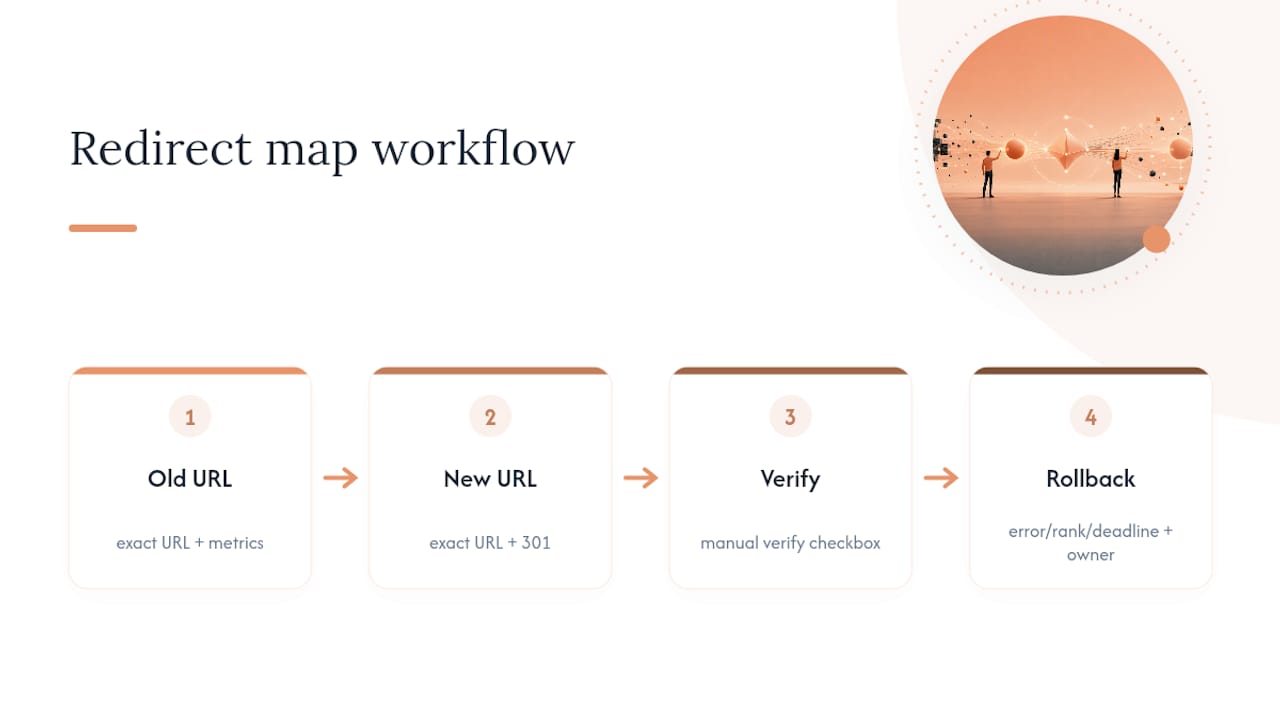
Your rollback plan should state, in writing, what conditions trigger a rollback (a specific error rate threshold, a specific ranking drop percentage, or a hard deadline for fixing critical redirects) and who has authority to pull that trigger. A signed scope freeze that documents exactly what will and won't change during the migration window makes this rollback decision far easier, because you're comparing the live site against an agreed baseline instead of arguing about intent after something breaks.
Pro Tip: Don't rely on memory or "we'll catch it in QA" for your URL inventory. Export the crawl to a spreadsheet the day you start planning, and treat any URL not on that sheet as a URL that will 404 on launch day.
Redirect Strategy: Mapping, Canonicals, and Hreflang
The redirect map is where SEO-safe migrations succeed or fail, and the rule is simple to state and surprisingly hard to execute at scale: every old URL needs its own 301 redirect to the single most relevant new URL. Not a category. Not the homepage. The actual replacement page.
Wildcard redirects that send every old URL to the new homepage are the single most damaging shortcut teams take under launch-day pressure. Google has to interpret a homepage-wildcard redirect as a signal that the original content no longer exists anywhere, which strips the ranking value that URL had built rather than transferring it. If you have 4,000 URLs and no time to map them individually, that's a scope problem to solve before launch, not a redirect problem to paper over.
A few implementation rules that keep the redirect layer clean:
- Implement redirects at the server level (via your web server config, CDN rules, or hosting platform) rather than through client-side JavaScript or meta refresh tags, since server-side 301s are faster for crawlers to process and easier to audit in bulk.
- Never chain redirects. If
/page-awas already redirecting to/page-bbefore the migration, and/page-bis now moving to/page-c, update the original rule to point straight from/page-ato/page-c. - Test your entire redirect map with a crawler before launch, not a manual sample. Crawl your list of old URLs against the staging or live redirect rules and flag anything that doesn't return a clean single-hop 301.
One-hop, server-level redirects are consistently faster to audit and more reliable than application-level redirect logic, particularly at scale where a single misconfigured rule can silently break hundreds of URLs.
Redirects alone aren't the whole job. Update every canonical tag to point to the new URL structure, not the old one left over from a template that wasn't fully updated. If you run an international site, update hreflang annotations to reference the new URLs in every language and region variant, since a stale hreflang cluster pointing at dead URLs confuses Google about which page serves which market. Regenerate your XML sitemap to list only new, live URLs, and submit it fresh in Search Console once the new site is live.
Pro Tip: Run your old sitemap and your new sitemap through a crawler side by side before launch. If a URL exists in the old sitemap but has no corresponding row in your redirect map, you've found a gap that would otherwise surface as a 404 on launch day.
Staging Environment Testing Before You Flip the Switch
Staging is where you catch problems while they're still cheap to fix. The checklist here has two halves: keeping the environment properly blocked while you build, and then unblocking it in a controlled way to test what search engines will actually see.
- Block staging from indexing correctly. Use a password wall or IP allowlist rather than relying solely on a
noindexmeta tag or a disallow rule in robots.txt, since either of those can accidentally get pushed to production if a developer forgets to remove them before launch. - Once the build is stable, consider a brief window where the new domain becomes crawlable ahead of the redirect flip. Some practitioners now favor a seven to fourteen day early-launch window for sites with fewer than roughly 100,000 URLs, letting Google discover the new structure before redirects consolidate signals, though this only works if you can keep old URLs crawlable in parallel and your inventory is complete enough to trust.
- Test every redirect in your map against the staging environment, using the exact final URLs, not placeholder ones.
- Check for mixed content warnings in the browser console on every major template, since an HTTPS migration commonly leaves stray
http://references in images, scripts, or stylesheets that trigger browser security warnings. - Audit metadata: title tags, meta descriptions, and canonical tags on a sample of high-traffic templates to confirm nothing reverted to CMS defaults during the build.
- Verify internal links point to final URLs rather than old paths that will now rely on a redirect hop internally, which slows crawl efficiency even if it doesn't break anything outright.
- Run Core Web Vitals checks on staging using PageSpeed Insights or a similar tool, since a slower new template can offset SEO gains from the migration itself.
Dev and SEO need a shared sign-off gate before launch, not a verbal "looks good to me." Define pass/fail criteria in writing (zero broken redirects in the sample crawl, zero mixed-content warnings on core templates, Core Web Vitals within an agreed threshold) and require explicit sign-off from both sides before the go-live window opens.
Launch Day: The First 48 Hours
The first two days after cutover are when small mistakes either get caught or start compounding. Work through this in order.
- Remove any remaining staging blocks, password walls, or disallow rules from the live environment immediately after cutover.
- Confirm every redirect resolves in a single hop to its final destination URL. Spot-check high-value pages manually using Search Console's URL Inspection tool, and run your full redirect map through a crawler to catch anything the manual check missed.
- Submit your updated XML sitemap in Search Console and confirm it's being read without errors.
- Check your robots.txt file for any leftover disallow rules from staging that accidentally made it to production.
- Monitor server logs for a sudden spike in 4xx or 5xx status codes, which usually signals a redirect gap or a broken template rather than a search engine issue.
- Watch Search Console's crawl stats for anomalies in the hours after launch, since a sudden crawl error spike often surfaces before it shows up anywhere else.
Keep a simple triage list ready before launch so you're not improvising under pressure: a spike in 404s usually points to a missing redirect entry, a spike in 500s usually points to a server configuration issue, and a sudden drop in indexed page count usually points to a robots.txt or noindex tag that shouldn't be there. Fix redirect and indexability issues first; cosmetic problems can wait.
Pro Tip: Keep the same three people (a developer, an SEO lead, and whoever owns the hosting environment) on call for the full first 48 hours. Migrations rarely fail because of one big mistake, they fail because a small one goes unnoticed for three days.
Post-Launch Monitoring: The First 14 Days and Beyond
Recovery speed correlates directly with how closely you watch the first two weeks. Migration case studies consistently show that daily monitoring and same-day fixes in that initial window produce faster recoveries than a "check back in a month" approach.
What the data shows: Domain migrations can take months to fully recover, and the failures that drag on longest almost always trace back to two root causes: URLs missing from the pre-migration inventory, or wildcard redirects that dumped traffic on the homepage instead of the matching page. Neither failure is exotic. Both are preventable with the inventory work covered earlier in this checklist.
Your daily runbook for the first 14 days should cover:
- Search Console coverage report: watch for a rising "not found" or "excluded" count, which signals redirect or indexability gaps.
- GA4 sessions on your top 20 to 50 landing pages by prior traffic, tracked daily against your pre-migration baseline.
- Rank tracking on your top 500 keywords (or however many you can reasonably track), watching for pages that dropped out of the index entirely versus pages that simply slipped a few positions.
- Server log review for 4xx and 5xx spikes, which often appear before ranking data reflects a problem.
Once the first two weeks pass, shift to a weekly and monthly cadence: backlink profile checks to confirm external links are still resolving through your redirects rather than hitting dead ends, indexation counts in Search Console, ongoing crawl error trends, and a broader look at page experience metrics like Core Web Vitals.
Recovery timelines vary by migration type and site size, but expect weeks rather than days even on a clean migration, and be prepared for a longer tail on larger or more complex moves. If you're 30 days out and still seeing a downward trend rather than a plateau or recovery, that's your signal to audit the redirect map again rather than wait it out. A targeted fix on a handful of high-traffic URLs often resolves a stubborn plateau faster than a full re-audit.
The Migration Mistakes That Cause the Biggest Losses
Almost every catastrophic migration story traces back to one of a handful of repeatable errors, not bad luck.
- Missing redirects. A URL in the old inventory has no matching row in the redirect map, so it returns a 404 on launch day. Prevent this by crawling the old sitemap against the live redirect map before launch and treating any unmatched URL as a blocker, not a follow-up task.
- Wildcard redirects to the homepage. Every unmapped URL gets sent to
/instead of its actual replacement, which tells Google the original content is gone rather than moved. Prevent this by banning wildcard homepage rules from the redirect config entirely and requiring a specific destination for every row. - Bundling too many changes at once. A domain change, a redesign, and a CMS migration all launch the same week, making any resulting ranking drop impossible to diagnose. Prevent this with the scope freeze and phasing decision covered earlier.
- Blocking the old domain after launch. Some teams disable or delete the old domain immediately, which prevents Google from ever crawling the 301s that transfer signal to the new site. Keep the old domain live and crawlable, and keep those redirects active for at least a year, longer when practical.
- Skipping the Change of Address tool on a domain move. Google's Change of Address setting reinforces the transfer signal for roughly 180 days, but it works alongside proper 301s and canonical hygiene, not instead of them.
Chrome Cactus Studio's Notes From Managed Migrations
Senior-led execution changes the failure rate on migrations, and it's not a subtle difference. Most catastrophic migration stories trace back to a junior team member missing a redirect row under deadline pressure, or nobody owning the daily monitoring once launch week excitement fades. Chrome Cactus Studio runs migrations with the same senior operator handling the inventory, the redirect map, and the first 14 days of monitoring, since splitting that ownership across multiple people is where communication gaps start.
One pattern that shows up repeatedly on client engagements: the sites that recover fastest are the ones where someone treated the redirect map as a living document through day 14, not a file that got finalized before launch and never opened again. Ranking recovery timelines vary by site, but the case work behind that pattern holds consistently across the migrations we've run.
Handling International SEO During a Migration
Hreflang gets forgotten in migration planning more often than almost anything else on this checklist, and the failure mode is quiet. Nothing 404s. Rankings just slowly drift wrong for international markets over several weeks.
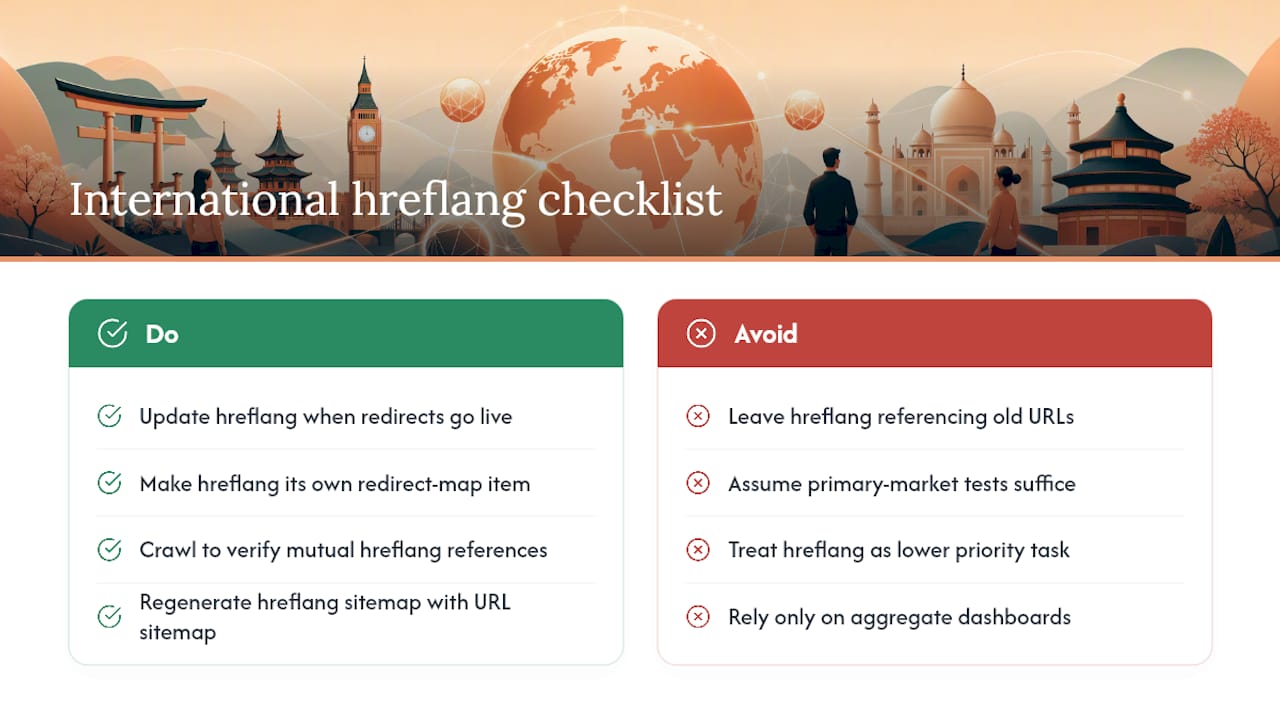
If your site serves multiple languages or regions, every hreflang annotation needs updating to reference the new URL structure at the same time as your redirects go live, not afterward. A common failure: the redirect map gets built and tested thoroughly for the primary market, while the es-MX, fr-CA, or de-DE variants still reference old URLs in their hreflang tags. Google reads that mismatch as a signal problem, and it can quietly serve the wrong regional page to the wrong audience or drop the international variants from consideration entirely.
Treat hreflang updates as their own line item in the redirect map, not an assumed byproduct of updating the main URL set. For every URL in your inventory that has language or region variants, confirm the new hreflang cluster references only live, redirected URLs, with no dead links back to the old domain. Run a crawl specifically checking for hreflang return tags (each page in a cluster needs to reference every other page in that cluster, and vice versa) since a one-directional hreflang reference is functionally broken even though it looks fine at a glance.
If your sitemap includes hreflang annotations directly (a common pattern for larger international sites), regenerate that sitemap alongside your standard URL sitemap rather than treating it as a separate, lower-priority task. International markets often get less attention during a migration simply because the primary market's traffic dominates the dashboards teams watch daily. Build a separate row in your daily runbook specifically for international search performance so a slow regional decline doesn't hide behind healthy aggregate numbers.
Telling Stakeholders and Users What's Changing
A migration that goes technically perfect can still generate a wave of confused emails and a spike in support tickets if nobody outside the project team saw it coming. Communication is a migration task, not a courtesy.
Internally, tell stakeholders what to expect before launch, specifically that organic traffic may dip temporarily even on a well-executed migration, and give them a realistic timeline for recovery rather than letting them discover a traffic dashboard drop and panic. Sales and customer success teams should know the launch date and have a one-line explanation ready if a customer mentions a broken bookmark or an odd URL in their browser history.
Externally, if bookmarked URLs, saved links in emails, or third-party directory listings point to your old URLs, a working 301 redirect handles most of that automatically and invisibly. Where you have control over the messaging (an email newsletter, a support knowledge base, a partner directory you manage), update those references proactively rather than relying entirely on redirects to catch every case indefinitely.
If your migration involves a visible design change alongside the technical one, a short heads-up banner or a brief note in your existing newsletter reduces the "did something break" reaction that otherwise floods your support inbox in the days right after launch. This costs almost nothing to prepare and meaningfully reduces the noise your team has to filter through while they're already watching redirect logs and ranking data.
Mobile and Core Web Vitals During the Move
Google evaluates the mobile version of your site as the primary version for indexing and ranking, which means a migration that looks fine on a desktop staging preview can still fail the metric that actually counts. Test every major template on an actual mobile viewport, not just a resized browser window, before you sign off on staging.
Core Web Vitals (Largest Contentful Paint, Interaction to Next Paint, and Cumulative Layout Shift) frequently get worse during a migration, usually because a new template ships with heavier images, an unoptimized font-loading strategy, or third-party scripts that weren't on the old site. Since these metrics factor into how Google assesses page experience, a new site that ranks well on content but loads slowly on mobile can underperform the old version it replaced, even with a flawless redirect map.
Run PageSpeed Insights or a similar tool against your staging templates for both mobile and desktop before launch, and treat a regression against your old site's scores as a blocker, not a "we'll optimize it later" item. Layout shift is worth particular attention on a redesign, since new ad placements, embedded widgets, or lazy-loaded images are common, quiet sources of a worse CLS score that a purely visual QA pass will miss entirely.
If your migration includes a CMS change, check whether the new platform's default image handling, font loading, and script bundling behave differently than your old setup. A platform switch can introduce Core Web Vitals regressions that have nothing to do with your actual content or design, purely from how the new system serves assets by default.
CMS and Platform-Specific Migration Pitfalls
Every content management system has its own quirks that can quietly undermine an otherwise solid migration plan, and they rarely show up until launch day.
Platforms that auto-generate canonical tags sometimes default every paginated or filtered URL to the same canonical target, which can suppress pages you actually want indexed. Platforms with built-in redirect managers often cap how many redirect rules you can add or struggle with pattern-based rules at scale, forcing you to handle high-volume redirects at the server or CDN level instead. If you're moving off a legacy CMS that generated URLs dynamically (query strings, session IDs, or ID-based paths), your inventory needs to capture every variant Google actually indexed, not just the clean paths your new CMS will generate.
Headless and JavaScript-heavy platforms introduce a different risk: if your new build renders content client-side without proper server-side rendering or pre-rendering, crawlers may see a blank or incomplete page even though users see a fully loaded one. Test how your new platform renders to a crawler, not just to a browser, using Search Console's URL Inspection tool on a sample of new URLs before launch.
Finally, check how your new platform handles trailing slashes, uppercase versus lowercase URLs, and www versus non-www variants. Inconsistent handling here creates duplicate content issues that a redirect map alone won't fix unless the platform's URL normalization rules are configured correctly from day one.
What the Checklist Gets Right, and Where It Falls Short
Most migration advice treats every step as equally important, and that's the biggest thing wrong with conventional guidance on this topic. In practice, the redirect map and the first 14 days of monitoring account for the overwhelming majority of outcomes. A team that nails those two things and is mediocre everywhere else usually recovers fine. A team that's meticulous about staging tests but sloppy on redirect mapping or checks out after launch week almost never does.
The industry also underweights how much bundling changes costs you in diagnosis time. A ranking drop with one variable changed is a two-hour fix. The same drop with four variables changed can burn a week of guesswork before anyone finds the actual cause.
If you take one thing from this checklist, make it the daily runbook. Not the audit, not the staging tests, the daily habit of checking coverage reports, session data, and server logs for two straight weeks after launch. That habit catches problems while they're still cheap to fix, and it's the single behavior that separates migrations that recover in a month from the ones that drag on for a quarter.
— Anas
When a Managed Migration Makes Sense
Not every team has a spare two weeks to run daily redirect audits and log reviews on top of their regular workload, and that's exactly the gap Chrome Cactus Studio's migration engagements are built to close. Instead of handing your redirect map to a junior account manager, you get a senior operator running the inventory, the redirect testing, and the daily runbook personally, the same person, start to finish, rather than a rotating cast learning your site as they go.

A managed engagement typically covers the full arc: the pre-migration URL inventory and baseline export, a complete 1:1 redirect map with rollback conditions defined in writing, launch-day verification, and the daily monitoring runbook through the critical first 14 days. For migrations involving a domain change, a CMS switch, or a large URL restructure, having one senior person accountable for every stage removes the coordination gaps that usually cause the worst outcomes.
If you're weighing whether to run this in-house or bring in a senior team to manage it, Chrome Cactus Studio takes on a limited number of client engagements at a time specifically so senior operators can handle work like this directly rather than delegating it. Reach out to talk through your migration timeline and get a sense of what a managed engagement would look like for your site.
Sources
- Site Moves and Migrations | Google Search Central
- Website Migration SEO Best Practices To Preserve Rankings And Avoid Common Pitfalls
- The Complete Website Migration Checklist SEO-Friendly
- Website migrations: a plan to keep your traffic and SEO safe | Search Engine Land